Lesson 1.A · Module 1: Define the Project
How to Set Up a Project Charter
The project charter is the one-page agreement that keeps a DMAIC project focused. Here's how to write one your sponsor will sign.
14 min read
What is a project charter?
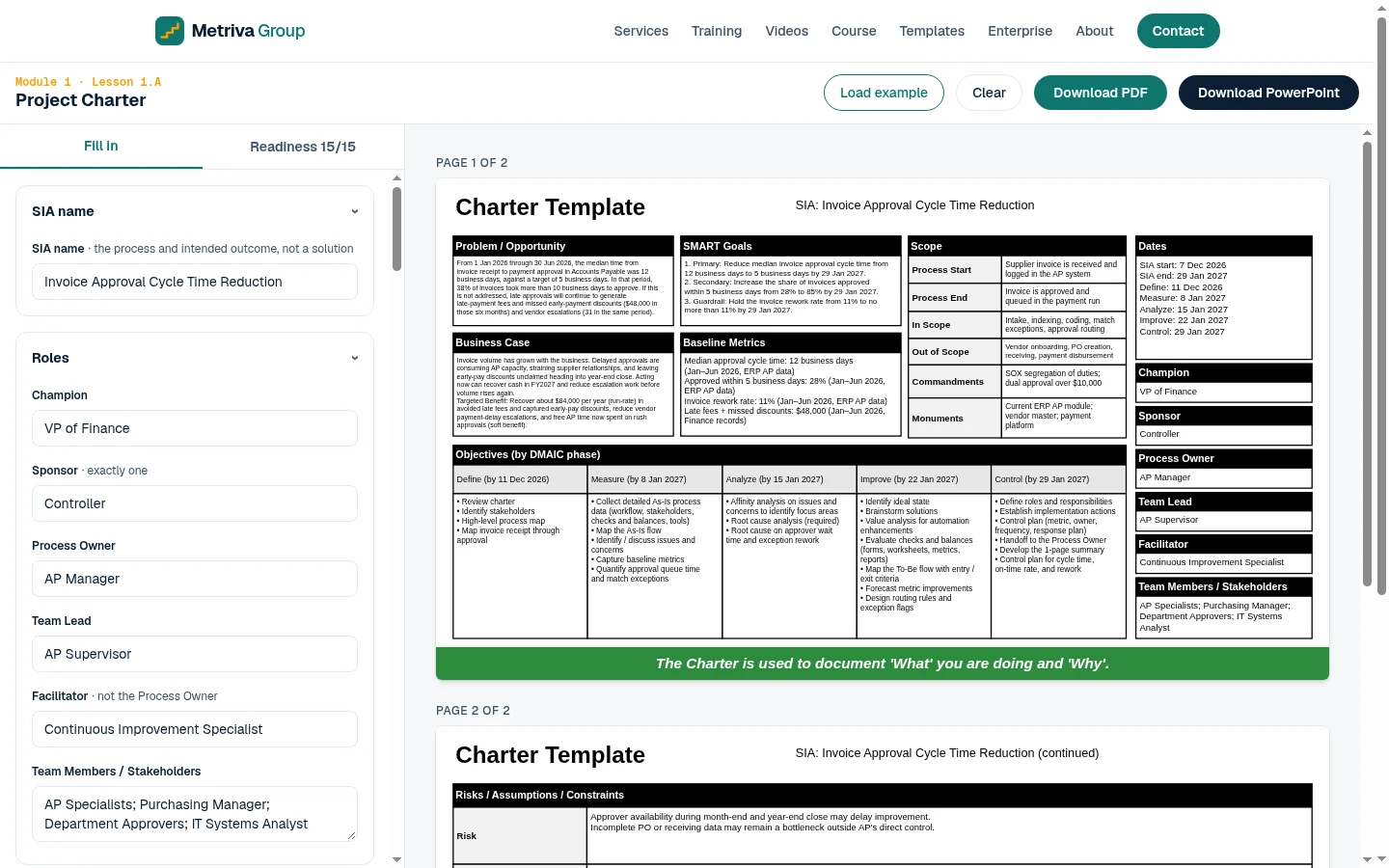
A project charter is the one-page agreement for an improvement project. In the Metriva Group method that project is an SIA. The charter states why the work exists, what will change, who is involved, and how success will be measured. It is the first deliverable in the Define phase of DMAIC. The process map, the baseline, and the control plan all stand on this page.
The preview prints a reminder along the bottom: the charter is used to document what you are doing and why.
A good charter does three things:
- Aligns the sponsor, the champion, and the team on the same problem
- Protects the project from scope creep
- Gives you a baseline to measure results against
Leaders use the page to decide whether the work deserves people and a calendar. The team uses it to hold that decision when a side problem shows up in week three.
Before you start
Talk with your sponsor before you fill in a box. The sponsor is the one leader who owns the outcome and can clear roadblocks. You need their view of the problem and a real commitment of time and people. A charter written alone at a desk rarely survives its first review.
Have the process owner in that conversation, or later the same day. They know where the work actually starts and stops.
Bring this with you:
- A recent window of performance: what is happening, where, since when, and by how much
- The impact if nothing changes, in cost, time, customer effect, or compliance
- The event that starts the process and the event that ends it
- Policies you cannot waive, and systems or tools this SIA cannot change
- A name for one Sponsor, a Champion, the Process Owner, a Team Lead, and a Facilitator who does not own the process
Block about an hour once those facts are in the room. When a number is still a guess, mark it as an estimate in the tool. Measure is where you replace that guess with a sourced figure.
The tool saves your draft in this browser as you type. Download the PDF or PowerPoint before you switch computers. The draft stays on the machine where you wrote it.
Open the tool
Open the Project Charter tool. Two tabs sit above the form: Fill in and Readiness. Fill in is where you write. Readiness runs 15 checks before anyone signs.
The header of the tool has four buttons.
Load example asks you to confirm, then replaces the form with a finished charter named Invoice Approval Cycle Time Reduction. Use it to see what a complete page looks like. The figures in that example are illustrative teaching data. Clear also asks you to confirm, then wipes every field. Download PDF and Download PowerPoint save the preview. The file is named "Project Charter" plus your SIA name.
If a passage is too long for its box, the preview outlines that box in red and a note appears under the form. Shorten the text so the download prints cleanly.
The form opens with the SIA name, then Roles and Dates. Fill the sections in any order. The steps below follow the argument of the charter: the name, the problem, the case, the goals, the baseline, the scope, then the people, the calendar, the phase work, and the risks.
Step 1: Name the SIA
The field hint reads: the process and intended outcome, not a solution.
Weak: Implement a new AP automation platform.
Good: Invoice Approval Cycle Time Reduction.
The strong name tells a leader which process is in play and what should be different when the SIA ends. The weak name commits the team to a tool before anyone has studied the work.
Common mistake: putting the solution in the title. On the Readiness tab, confirm by hand that the name is the process and the outcome.
Step 2: Write the problem statement
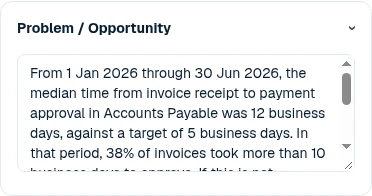
The Problem / Opportunity box asks for what is happening, where, since when, by how much, and the impact if it is not addressed. Leave out the cause, the solution, and any blame.
In the worked example the statement reads: from 1 Jan 2026 through 30 Jun 2026, the median time from invoice receipt to payment approval in Accounts Payable was 12 business days, against a target of 5 business days. In that period, 38% of invoices took more than 10 business days to approve. The impact in that same window was late-payment fees and missed early-payment discounts of $48,000, and 31 vendor escalations.
Weak: Approvers sit on invoices because the system is old, so we need a new workflow tool.
Good: The example above. It names the process, the place, the dates, the size of the gap, and the impact.
Common mistake: explaining the cause or naming the fix. The automatic check flags the words "because", "we need to", and "should". Rephrase any sentence that needs those words so a stranger could measure it.
Step 3: Write the business case
The business case answers the question printed on the field: Why this matters now. Tie the problem to something leadership already tracks, such as cost, cash, customers, capacity, safety, or compliance.
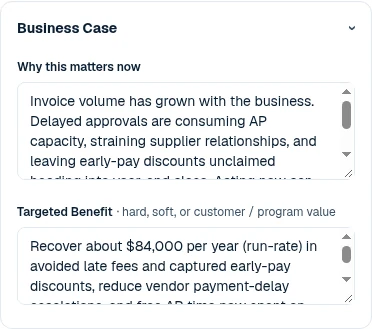
In the example, invoice volume has grown with the business. Delayed approvals are consuming accounts payable capacity, straining supplier relationships, and leaving early-pay discounts unclaimed heading into year-end close. Doing the work in this window can recover cash in the next fiscal year and cut escalation work before volume rises again.
Under that, fill in Targeted Benefit. The hint reads: hard, soft, or customer / program value. Hard value is money you can trace. Soft value is time or capacity you get back. Customer or program value is a result a customer or a program owner would recognize.
The example sets the targeted benefit at about $84,000 per year in avoided late fees and captured early-pay discounts, fewer vendor escalations, and accounts payable time freed from rush approvals.
Common mistake: a benefit the goals cannot support. Before you route the charter, confirm the targeted benefit is no larger than the SMART goals would deliver, and that the units match the problem and the baselines. That item sits under "Also confirm by hand" on the Readiness tab.
Step 4: Set SMART goals
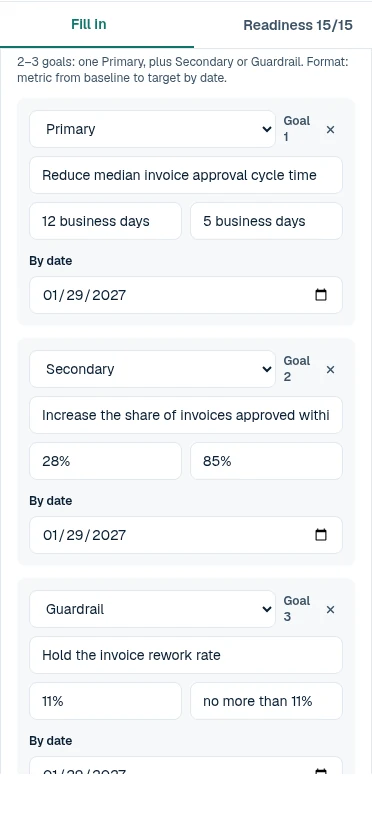
Write 2–3 goals: one Primary, plus a Secondary or a Guardrail. The form's format line reads: metric from baseline to target by date.
Primary, Secondary, and Guardrail
- Primary. The result this SIA exists to deliver. Use exactly one.
- Secondary. Another result you intend to move, alongside the primary.
- Guardrail. A metric you will hold steady while you chase the primary.
The worked example uses all three, each dated 29 Jan 2027, which is the SIA end date:
- Primary: Reduce median invoice approval cycle time from 12 business days to 5 business days.
- Secondary: Increase the share of invoices approved within 5 business days from 28% to 85%.
- Guardrail: Hold the invoice rework rate at no more than 11%, from a baseline of 11%.
Every goal needs a metric, a baseline, a target, and a date. The date falls on or before the SIA end date.
Common mistake: marking more than one goal as Primary, or changing the measure so the before and after cannot be compared. The Primary should use the same measure as the problem statement.
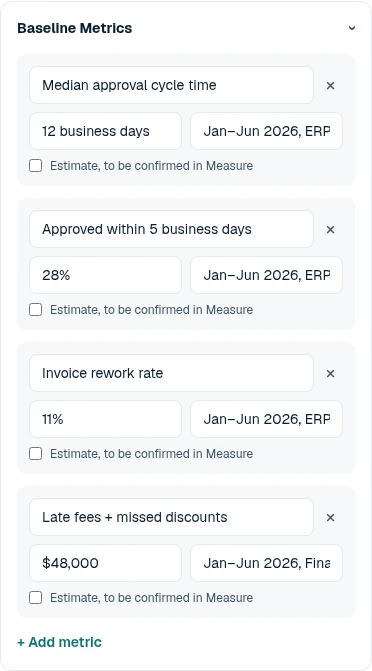
Step 5: Record baseline metrics
Each baseline has a name, a value, and a period / source. A checkbox reads Estimate, to be confirmed in Measure.
Check it when the number is the best figure you have and Measure will replace it. Leave it unchecked when you can point to a system and a period, as the example does.
The example records four baselines, and none of them are marked as estimates:
- Median approval cycle time: 12 business days. Jan–Jun 2026, ERP AP data.
- Approved within 5 business days: 28%. Jan–Jun 2026, ERP AP data.
- Invoice rework rate: 11%. Jan–Jun 2026, ERP AP data.
- Late fees and missed discounts: $48,000. Jan–Jun 2026, Finance records.
Common mistake: a bare number, with no period and no source. If the baseline changes once you measure it, save a new version of the charter and take it back to the Sponsor. That is a hand check on the Readiness tab.
Step 6: Set the scope
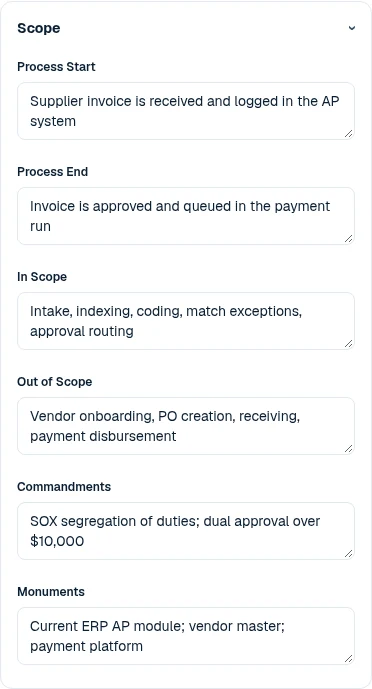
Scope is six fields. Readiness passes this section only when all six are filled.
- Process Start. The event that starts the process. In the example: the supplier invoice is received and logged in the AP system.
- Process End. The event that ends it. In the example: the invoice is approved and queued in the payment run.
- In Scope. The steps this SIA will touch. In the example: intake, indexing, coding, match exceptions, and approval routing.
- Out of Scope. The steps it will leave alone. In the example: vendor onboarding, PO creation, receiving, and payment disbursement.
Commandments and monuments
Commandments are non-negotiable policies and procedures. In the example: SOX segregation of duties, and dual approval over $10,000.
Monuments are systems or tools that cannot be moved or altered in this SIA. In the example: the current ERP AP module, the vendor master, and the payment platform.
Weak commandment: Cut the number of approval steps.
Good commandment: SOX segregation of duties; dual approval over $10,000.
Weak monument: Replace the ERP this quarter.
Good monument: Current ERP AP module; vendor master; payment platform.
Commandments are policies. Monuments are systems and tools. The hand check on Readiness uses those definitions.
Common mistake: listing a system change as in scope when that system is a monument. If the team cannot alter it during this SIA, say so in Monuments. The constraint list on page 2 should say the same thing.
Step 7: Name the roles
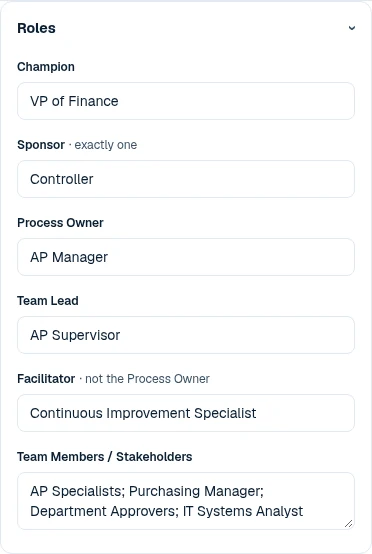
The form asks for a role or title, and a name if you know it. The example uses titles.
- Champion. Senior support for the SIA. In the example: VP of Finance.
- Sponsor. Exactly one person. This leader owns the outcome and signs as Sponsor on page 2. In the example: Controller.
- Process Owner. The person who runs the process after the SIA ends. In the example: AP Manager.
- Team Lead. Runs the SIA day to day. In the example: AP Supervisor.
- Facilitator. Runs the method. The hint on the field reads: not the Process Owner. In the example: Continuous Improvement Specialist.
- Team Members / Stakeholders. People who do the work or who have to be consulted. In the example: AP Specialists; Purchasing Manager; Department Approvers; IT Systems Analyst.
One Sponsor keeps a single definition of success. The sign-off block is titled "Sign-off (one Sponsor only)." A second senior leader belongs in Champion, or in Team Members / Stakeholders.
Keep the Facilitator independent of the Process Owner and the Team Lead. The Facilitator runs the method. The Process Owner stays accountable for the process. Readiness fails when the Facilitator matches the Process Owner or the Team Lead.
Common mistake: typing the Process Owner into the Facilitator field, or putting two names in Sponsor.
Step 8: Set the dates and DMAIC gates
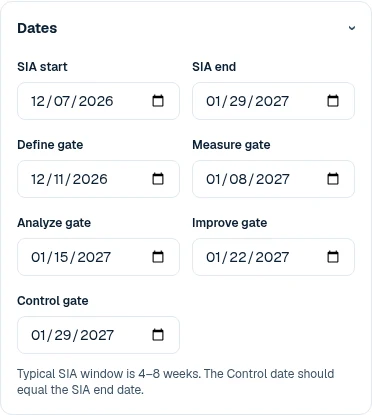
Enter an SIA start, an SIA end, and a gate date for Define, Measure, Analyze, Improve, and Control.
The note under the fields reads: typical SIA window is 4–8 weeks. The Control date should equal the SIA end date.
The worked example uses these dates:
- SIA start: 7 Dec 2026
- Define gate: 11 Dec 2026
- Measure gate: 8 Jan 2027
- Analyze gate: 15 Jan 2027
- Improve gate: 22 Jan 2027
- Control gate and SIA end: 29 Jan 2027
Readiness checks the length of the window, checks that the phase dates run in DMAIC order inside that window, and checks that Control equals the end date. Changing the SIA end date moves Control with it when Control is blank or already equal to the previous end date.
Common mistake: stretching the SIA across many months, or letting Control fall after the end date. Work that cannot finish in 4 to 8 weeks belongs in another plan, or in Out of Scope.
Step 9: Add objectives by phase
Each DMAIC phase already lists standard activities. They appear on every charter, and the form will not let you remove them. Add only the work that is specific to this SIA. The note on the section reads: standard activities are always included.
Define. Review charter. Identify stakeholders. High-level process map. The example adds: map invoice receipt through approval.
Measure. Collect detailed as-is process data (workflow, stakeholders, checks and balances, tools). Map the as-is flow. Identify and discuss issues and concerns. Capture baseline metrics. The example adds: quantify approval queue time and match exceptions.
Analyze. Affinity analysis on issues and concerns, to find focus areas. Root cause analysis, which the form marks as required. The example adds: root cause on approver wait time and exception rework.
Improve. Identify ideal state. Brainstorm solutions. Run a value analysis for automation enhancements. Evaluate checks and balances (forms, worksheets, metrics, reports). Map the to-be flow with entry and exit criteria. Forecast metric improvements. The example adds: design routing rules and exception flags.
Control. Define roles and responsibilities. Establish implementation actions. Write the control plan (metric, owner, frequency, response plan). Hand off to the Process Owner. Develop the 1-page summary. The example adds: a control plan for cycle time, on-time rate, and rework.
Common mistake: typing the standard activities in again, or parking a solution in Define. Define reviews the charter and maps the process. Solutions belong in Improve, after the root-cause work in Analyze.
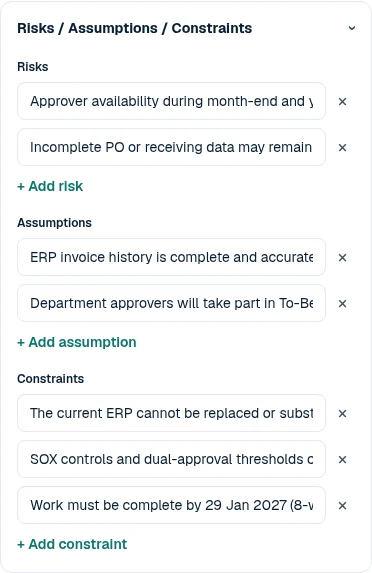
Step 10: Record risks, assumptions, and constraints
Readiness asks for at least one of each. State the risk and the likely impact, the assumption the SIA depends on, and the limit on options or timing.
The example records:
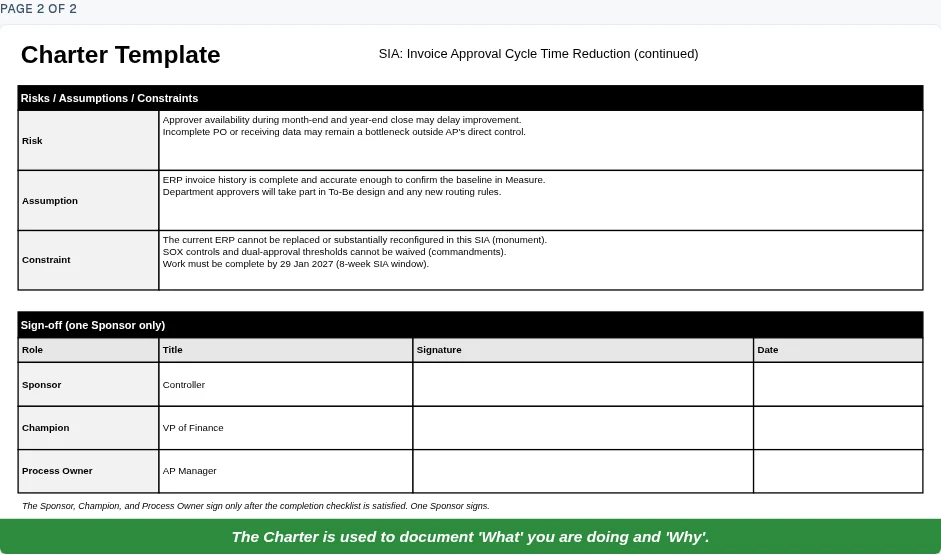
- Risk. Approver availability during month-end and year-end close may delay the improvement. Incomplete purchase-order or receiving data may stay a bottleneck outside accounts payable's direct control.
- Assumption. ERP invoice history is complete enough to confirm the baseline in Measure. Department approvers will take part in the to-be design and in any new routing rules.
- Constraint. The current ERP cannot be replaced or substantially reconfigured in this SIA (it is a monument). SOX controls and the dual-approval threshold cannot be waived (they are commandments). The work finishes by 29 Jan 2027.
Common mistake: leaving this blank and planning to "handle issues later." A blank list is how a scope surprise reaches the Sponsor after the signature.
Check readiness and get sign-off
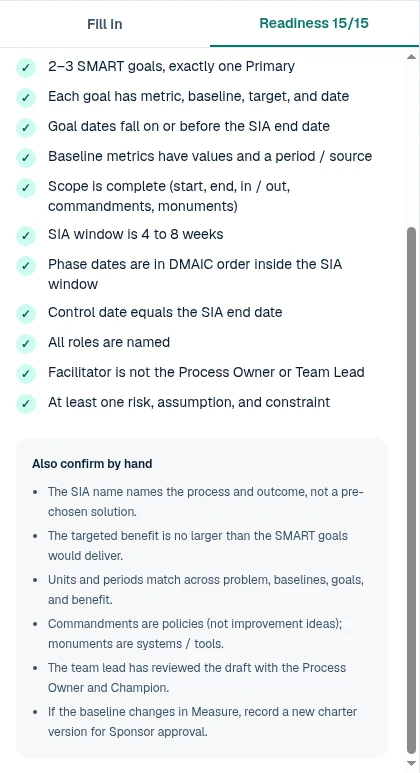
Open the Readiness tab before you ask anyone to sign. The introduction on that tab reads: complete these before routing the charter to the Sponsor, Champion, and Process Owner for sign-off.
Fifteen checks run on their own. They cover the SIA name, the problem, cause-and-solution language, the business case and targeted benefit, the shape of the goals, the baselines, all six scope fields, the 4–8 week window, DMAIC date order, the Control date, every role, an independent Facilitator, and at least one risk, assumption, and constraint. The worked example scores 15/15.
Under the checks, confirm these by hand:
- The SIA name names the process and the outcome, and does not name a solution chosen in advance
- The targeted benefit is no larger than the SMART goals would deliver
- Units and periods match across the problem, the baselines, the goals, and the benefit
- Commandments are policies, and monuments are systems or tools
- The Team Lead has reviewed the draft with the Process Owner and the Champion
- If the baseline changes in Measure, record a new charter version for Sponsor approval
When the checks pass, download the PDF or the PowerPoint. Page 2 of the preview holds the risks and the sign-off table. The signers are the Sponsor, the Champion, and the Process Owner. The columns are Role, Title, Signature, and Date. The line under the table says they sign only after the completion checklist is satisfied, and that one Sponsor signs.
Send that file to those three roles. Keep the charter in front of the team at each phase gate. If Measure changes a baseline, issue a new version and get the Sponsor's approval again. The page is short so that a change to it is a decision you can see.
Recap checklist
- The SIA name states the process and the outcome
- The problem states what, where, since when, how much, and the impact, with no cause and no solution
- The business case says why this matters now, and the targeted benefit fits the goals
- Two or three SMART goals, with exactly one Primary, and each goal has a baseline, a target, and a date on or before the SIA end
- Each baseline has a value and a period or source, and any guess is marked Estimate
- Scope has a start, an end, in, out, commandments, and monuments
- There is one Sponsor, and the Facilitator is neither the Process Owner nor the Team Lead
- The window is 4 to 8 weeks, the gates run in DMAIC order, and Control equals the end date
- There is at least one risk, one assumption, and one constraint
- Readiness shows 15/15, the hand checks are done, and the PDF is with the Sponsor, the Champion, and the Process Owner
Next step
Write the charter in the tool. Load the example first if you want a finished page beside you, then clear it and enter your own process.
When the charter is signed, map the process at a high level with a SIPOC. That is Lesson 1.B.
Next guide
Lesson 1.B: How to Build a SIPOC →